
文件系统
Created|Updated
|Post Views:
前言
文件系统,就是用来管理和存储文件的权限,属性,内容等文件信息的系统。
因操作系统的不同,文件系统也并不相同。Linux的正统文件系统为ext2。U盘使用的文件系统是FAT格式。
ext2(索引式文件系统)
包括
inode
一个文件占用一个inode,主要是存储文件的权限和属性,还记录文件所存储所在的数据区块的号码。数据区块
存储文件的内容,当文件太大时,就会占用多个区块超级区块
记录整个文件系统的信息,比如使用了多少个inode,数据区块的使用量
读取
inode指向文件
因为,每个inode都对应这个文件的数据块。所以,当我们要读取文件时,就可以通过inode作为索引,找到该文件的数据区块。inode指向目录
数据区块中仅存放文件名
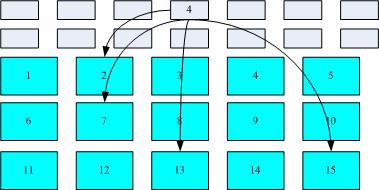
FAT
这种格式的文件系统没有inode的存在,就没有索引了。所以,它的读取数据区块速度较慢。
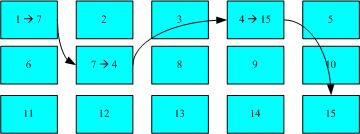
碎片整理
当我们要读取一个文件时,磁头会在磁盘上转动,如果保存文件的各个数据区块分散严重的话,磁头就会在磁盘中要多转几圈才能读取数据。碎片整理,就是要把这些数据区块整理到一起,这样读取文件的速度就会更快。
Related Articles
2020-04-19
文件权限/属性
前言linux上一个文件添加许多的属性,例如用户组的概念。当我们ls -al的时候,会看到(文件拥有者,用户组,其他人)的读,写,执行权限。 代表意义[权限][链接][拥有者名][用户组名][文件容量][修改日期][文件名] 拥有者,用户组对应相关权限 如果你不是拥有者,用户组,root,那么你就是others 简介 第一个字符是表面这个是文件,目录,链接文件还是设备d->directory(目录)-->文件l->链接文件(类似于windows的快捷方式)b->区块设备文件c->字符设备文件 剩下的字符以三个为一组它们有各自的身份。(文件拥有者,用户组,其他人) rwx这三个字符分别代表read,write,execute的权限 另外还有一个root身份,可以不受系统权限所限制。 修改属性和权限 -R如果要修改目录中的子目录和文件,只要在选项中加上-R chgrp-> change group,修改文件所属的用户组。(chgrp )users是用户组名,只有当此用户组名,列入 /etc/passwd这个文...
2021-06-19
Basic Concept
Processes ManagementA process, in simple terms, is an instance of running program. Whenever you issue a command in Linux, it creates or start a process. Processes TypesWhen you issue a command (a process), there are two ways you can run it. Foreground Process Background Process The simplest way to start a background process is to add an ampersand (&) at the end of the command. Checking Running ProcessesIt is easy to see your own processes by using the ps command. In addition, you ...
2020-08-16
linux上配置v2ray
预备工作 客户端:Qv2ray-refs.tags.v1.99.6-linux.AppImage v2ray核心文件:v2ray-linux-64 开始 将v2ray的zip文件unzip解压。 运行客户端sudo chmod +x ./Qv2ray-refs.tags.v1.99.6-linux.AppImage + ./Qv2ray-refs.tags.v1.99.6-linux.AppImage 在preferences中配置v2ray的core executable path(可执行文件)和v2ray assets directory(解压出来的目录) set system proxy 设置subscriptions Connect and enjoy!
2020-04-20
绝对路径与相对路径
前言/这个表示根目录下bin/这个表示bin的目录下 绝对路径一定要从根目录(/)写起,就是要写完整的路径名 相对路径不是从根目录写起 示例 当我们要cd(change directory)的时候,不论是要用绝对路径和相对路径,都要遵循到(根,当前,上一级)目录下,再到其他的目录(用目录名标识) cd ../bin 到上一级目录下的bin目录(相对路径)cd ./bin 到当前目录下的bin目录,等同于cd bin(相对路径)cd /bin 到根目录下的bin目录(绝对路径) 特殊的目录. 此层目录.. 上层目录- 上一个的目录(记录)~ home目录
2021-06-17
Shell & Shell scripts
IntroductionUsers communicate with the kernel through a program known as the shell. The shell is a command line interpreter; it translates commands entered by the user and converts them into a language that is understood by the kernel. Shell is an environment in which we can run our commands, programs, and shell scripts. A shell provides an interface to your Linux System. It gathers your inputs and executes programs based on that input. The shell is, after all, a real programming language, ...
2021-06-18
basic operations
FileListing File ls- listing files in current directory ls -l will help you get more information of the files To list the invisible files, specify the -a option to ls − Copying FilesTo make a copy of a file use the cp command. The basic syntax of the command is − 1$ cp source_file destination_file Renaming FilesTo change the name of a file, use the mv command. Following is the basic syntax − 1$ mv old_file new_file The mv command will move the existing file completely into the new file. ...
